

The NYT Crossword is the most famous of all US widely circulated crosswords and possibly of all word games until Wordle cam along. It was first published in 1942 and is currently reproduced in at least 300 different publications and online.
It is known to be famously difficult to the point where many beginners find it intimidating. In 2014, the New York Times created The Mini Crossword – a 5×5 grid, daily crossword – to reduce this barrier to entry and make crosswords more accessible.
It was designed as a gateway puzzle that attracts a younger audience and introduces them to crosswords. It’s short and designed to take advantage of micro moments, such as waiting for your coffee to be made by the barista.
This proved to be a great success – in 2024, The Mini Crossword was played 2.1 billion times.
In this article we’ll show you how to play The Mini and give you all the tricks and strategy you need to master it.
How to play The Mini
The Mini is a simple crossword puzzle. The rules are fairly simple. You need to fill a 5×5 grid with answers to clues, placing words horizontally (across) and vertically (down) so they cross over and share letters. Each correct word helps you confirm the others, letting you solve the puzzle by using both the clues and the crossed words together.
For example, in the image below, the clue for 1 across is “Battery warning from a smoke detector”. Because we have already solved 5 down, we know that the word ends in P.

Beyond the basics of a crossword puzzle, let’s talk about how The Mini works on mobile in the NYT Games app.
Selecting which word to answer
To play, click in a box and it will highlight the entire word to show you whether it is the word going down or the word going across.
You can see the clue for the crossword at the bottom of the page, above the keyboard. In this instance, it is “Alternative to streaming”.

However, if you wish to forget about the grid and just see the clues and answers boxes all in one place you can click the list icon. It changes the view from grid mode to list mode as you can see below.

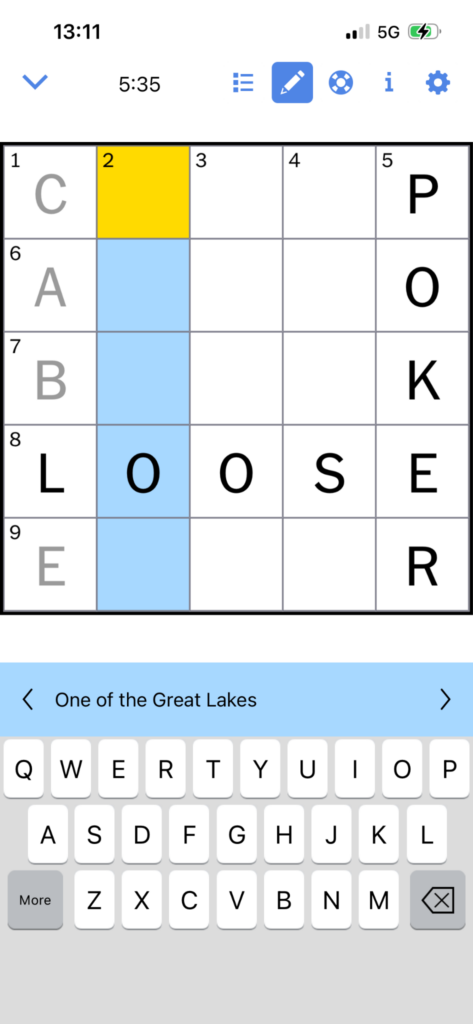
Pencil mode
Pencil mode has no concrete application. If you use this it does not stop you from completing the puzzle. However, it does change the colour of the font for your answer. The point of this is if you are unsure or guessing a word or letter, you can place it in the grid in pencil.
Then, in the event you make an error, you know where to start looking – with the words that you were unsure of.
Getting help with The Mini
On top of the clues for each word, there are some hints that you can use if you need a little bit of help. By pressing the lifebuoy icon.
Here you have the option to:
- Turn Autocheck on or off
- Check a square
- Check a word
- Check the whole puzzle
- Reveal/ Clear… a square, a word, or the entire puzzle
So you have a lot of options to get help.
The autocheck instantly tells you if the word/ square you are guessing is correct or incorrect. This can be useful if you are new at playing the Mini. Because if you get one word wrong, it can impact the intersecting words, throwing your whole game into shambles.
If you don’t want to check the entire puzzle instantly, you have the option to check the current square, current word, or everything you have guessed so far. This can give you the chance to have another go at anything you have gotten wrong when you are stuck.
For example, in the image above. After checking the puzzle you can see the T in 2 down is incorrect. It’s time to revisit that answer.

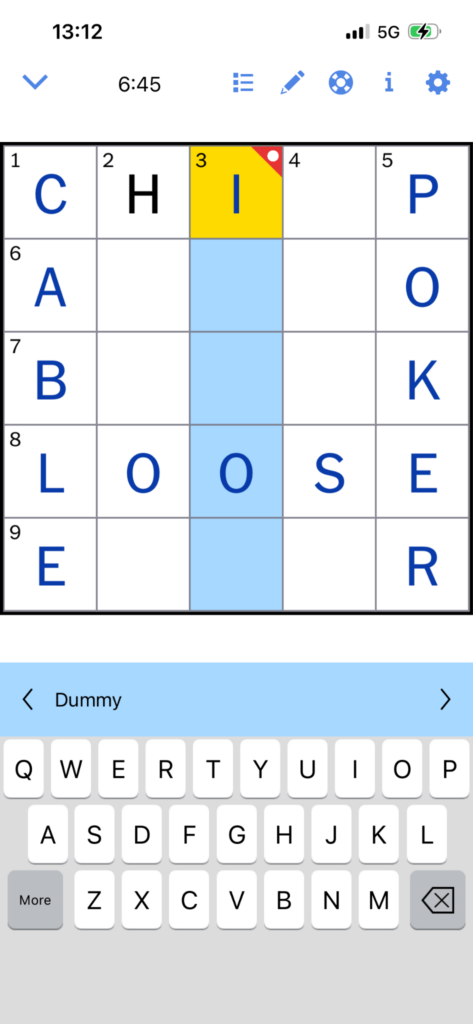
As you can see in 3 down, if you reveal a square, you are left with a red indicator that shows you received help for this answer.
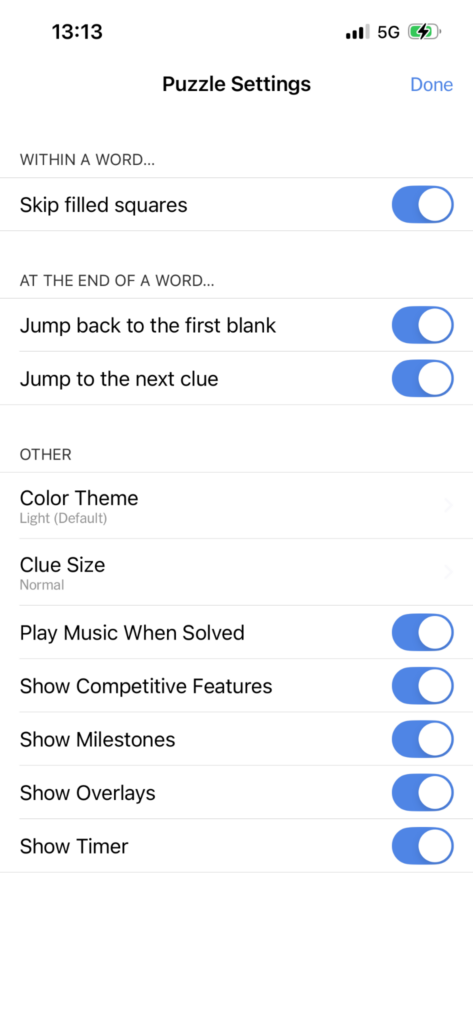
Puzzle settings
There are a few options you can toggle if you want to change the game play slightly. Personally, I leave things as they are. However, if any of these things annoy you for any reason feel free to turn them off.
The most popular option here is changing the theme from light mode to dark mode. But let’s run through the options:
Within a word…
- Skip filled squares – this means that if you already have a letter in the word from an intersecting word it will jump over that square and you do not have to type it twice
At the end of a word…
- Jump back to the first blank
- Jump to the next clue
Other than that, there are the options to:
- Change the color theme (Light or dark)
- Change the clue size
- Play music or not when the puzzle is solved
- Toggle on or off:
- Competitive features
- Milestones
- Overlay
- Timer
NYT The Mini strategy and tricks
Those who enjoy playing The Mini crossword should be aware of some specific clues that apply to both NYT games. Knowing these additional guidelines can help improve your answers and give you a winning edge!
- Answer words are never present in the clue.
- Answers will match their given clue by speech type, tense and language.
- Each time a clue ends in a question mark symbol, the solution will be a play on words.
- If a clue contains the tag “Abbr.”, the solution will be an abbreviation.
- When themes are present, they are found in symmetrical places on the grid.
- Profane, disturbing or explicit topics should not be expected to be included.
How to get better at crosswords
Despite their popularity, many players struggle to answer crosswords as hints can often be undescriptive or unclear.
Regular practice
Frequent engagement in any activity that requires a level of knowledge and skill is a surefire way to help you rapidly improve. Crosswords are no exception to this rule, so make sure to always have one at the ready to engage yourself in when you have a little down time. What’s more, crosswords are a great activity to come back to over the course of a day, as the game state stays the same from the last moment you interacted with it.
Learn vocabulary for crosswords
Unlike other types of word games, crosswords tend to include many words or phrases that are used less frequently in everyday language. Try to expose yourself to previous crossword solutions and over time, you should start to build up a solid knowledge foundation of solutions to the given hints.
Understand letter placement
Each time you decide to enter a word into a crossword, be aware of the letters it contains and also their letter position. As you are trying to solve the grid as a whole, one incorrect letter can have a huge impact on the other words you decide to play. By taking into consideration the specifics of each word you may be able to spot incorrectly entered words, which allows you to rectify them and carry on progressing.
Don’t rush
When playing crosswords it can be easy to get ahead of yourself and rush to fill in answers without exploring all possibilities. However, many crosswords are released daily like Wordle and many do not even have a time limit, so it is wise to take your time over each option before entering a word. Remember, even if you enter a wrong word, you can still correct it later on.
Use a solver
Although it shouldn’t be used every time, the answer to many crossword hints can be found using a solver such as WordRaiders’s Word Finder. For this to be most effective, try using it for words where you are already certain of a couple of letters.